How to run multiple Claude Code sessions at once
Short answer
Start each Claude Code session in its own terminal, ideally in a separate git worktree so they do not edit the same files. Running them inside tmux keeps them alive when the terminal closes. A sidebar such as hivemux shows which session is running, waiting for your input, or done, and jumps to it.
Claude Code works on one task per session, and a task often runs for minutes before it needs you again. Running several sessions side by side, one fixing a bug, one writing tests, one exploring another project, keeps you busy while each works. The two problems that come up are file conflicts between sessions and losing track of which one is waiting for you.
Step 1. Give each session its own working copy
Two sessions in the same folder share one working tree: both see each other’s half-finished edits and can overwrite them. For parallel tasks in one repository, give each session its own git worktree, a second checkout of the same repository on its own branch:
cd ~/code/apigit worktree add ../api-login-bug -b login-buggit worktree add ../api-tests -b more-testsEach folder has its own files and branch but shares the repository history. Remove a worktree when the task is merged:
git worktree remove ../api-login-bugClaude Code can also do this itself. claude --worktree <name> (or -w) creates a worktree under .claude/worktrees/<name>/ at the repository root on a new branch named worktree-<name>, and starts the session there. The repository needs at least one commit, and Anthropic’s docs suggest adding .claude/worktrees/ to .gitignore. A .worktreeinclude file lists gitignored files, such as .env, to copy into new worktrees.
claude -w login-bugSessions in different projects do not need this; they already have separate folders.
Step 2. Start one Claude per folder
The simplest setup is one terminal tab per session:
cd ~/code/api-login-bug && claude -n login-bugcd ~/code/api-tests && claude -n more-tests-n names the session, so it is easy to recognise later in the /resume list. This works, but each tab ends when it closes, and with five tabs you have to click through them to see which one stopped to ask a question.
Step 3. Put the sessions in tmux
tmux runs your sessions inside a server that stays up when the terminal closes. One tmux session per project and one window per Claude is a layout that scales:
tmux new -s api -c ~/code/api-login-bug -n login-bug 'claude -n login-bug'tmux new-window -t api -c ~/code/api-tests -n more-tests 'claude -n more-tests'tmux attach -t apiClaude Code’s --tmux flag combines both steps: claude -w feature-auth --tmux creates the worktree and a tmux session for it (it uses iTerm2 native panes when available; --tmux=classic forces plain tmux).
Switch windows with the prefix key and a number, sessions with prefix s. Closing the terminal detaches; tmux attach brings it all back. See How to use Claude Code with tmux for the settings worth changing (the prefix key and Shift+Enter in particular).
Step 4. Know which session needs you
With sessions spread across windows, the real cost is checking them. Two generic options:
- Hooks. Claude Code can run a command on its
NotificationandStophook events. Wire them to a desktop notification and you hear about sessions that need input or have finished. How to get notified when Claude Code needs input shows a working setup. - Agent view. Claude Code’s
claude agents(a research preview at the time of writing) is one screen for background sessions started withclaude --bg "<task>";claude attach <id>opens one. - tmux activity flags.
setw -g monitor-bell onmarks windows that rang the bell in tmux’s window list. It tells you something happened, not what.
hivemux is a tmux sidebar that shows every Claude Code session — running, waiting for you, or done — and lets you jump to the one that needs you. It registers Claude Code hooks that write each session’s state onto its tmux pane, and a sidebar in every tmux window draws the whole board.
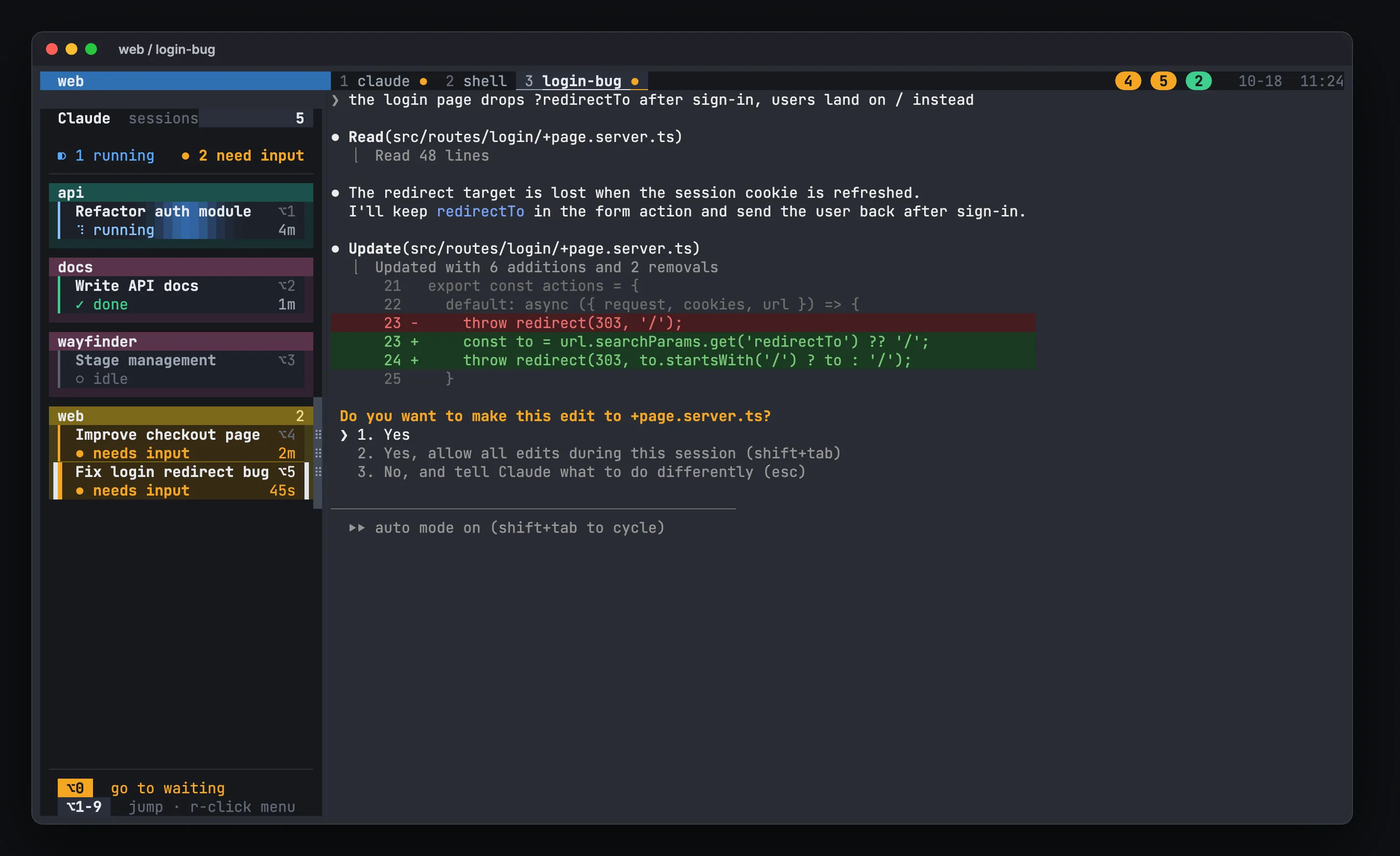
Install and set it up:
curl -fsSL https://hivemux.dev/install.sh | bashor
brew install esteban-eg-kim/tap/hivemuxhivemux setupStep 5. Work through the board
With hivemux, the daily loop looks like this:
hm ~/code/api-login-bugopens a tmux session for that folder with a Claude window and a shell window.hm ~/code/api-testsopens the next one. The first keeps working.- Prefix
Shift+Cadds another named Claude to the current project. - Watch the sidebar. Each card shows the task name, its state and how long it has been in it. Cards that need input pulse amber.
- Press
Option+0to jump to the session that has waited longest; press it again to work through the queue.Option+1…9jump to a specific card.
The right side of the tmux status line works like a food-court pickup board: a numbered badge for every task that needs input (amber) or finished and is not seen yet (green). You also get a macOS notification for those, except for the session you are looking at.
To keep a fixed order, drag cards and project headers in the sidebar; the Option numbers follow it.
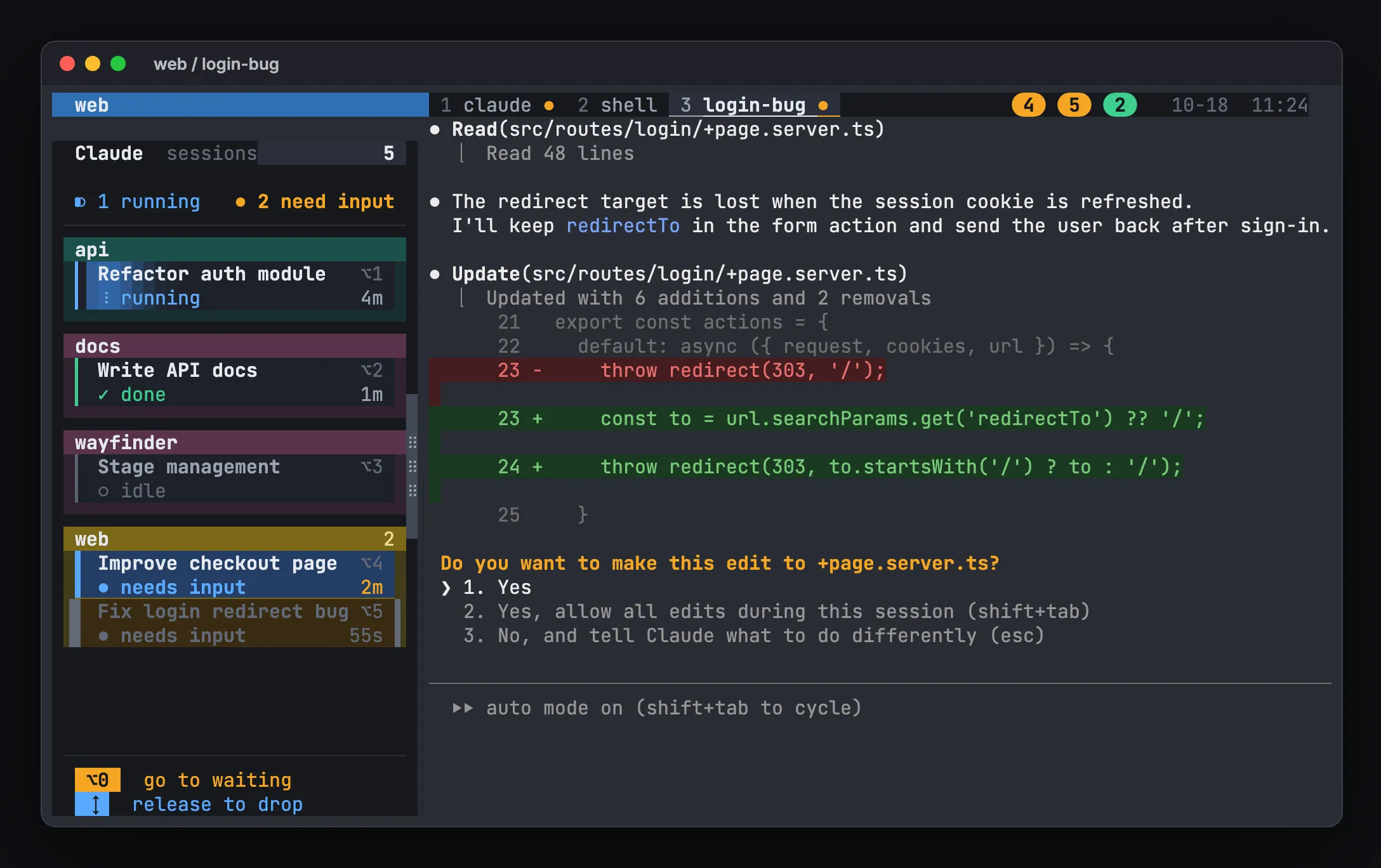
Step 6. Keep them across reboots
tmux alone stops at a reboot. hivemux installs tmux-resurrect and tmux-continuum to save the layout every 5 minutes and, on the next start, types claude --resume <id> in each pane so every conversation comes back where it was. Sessions you ended with /exit are not resumed. Details are in How to resume Claude Code sessions after a reboot.
Tips for running sessions in parallel
- Name sessions after the task (
claude -n login-bug) instead of leaving them to a generic title. - Keep tasks independent. Two sessions refactoring the same module in different worktrees will still produce merge conflicts later.
- Leave a shell window next to each Claude for git, tests and dev servers.
- Review as sessions finish rather than letting finished work pile up; that is what the green badges are for.
Other tools take different approaches, such as creating a worktree per task automatically. Claude Code session managers compared lists them side by side. To get started with hivemux, see /docs/install/ and /docs/quick-start/.
FAQ
Can two Claude Code sessions work in the same folder?
They can, but both edit the same working tree, so changes can collide. Use a separate git worktree (or a separate clone) per session when they touch the same repository.
How many Claude Code sessions can I run at the same time?
There is no fixed number in the CLI itself. The practical limits are your plan's usage limits, your machine, and how many sessions you can review; each session uses your account's usage.
Does hivemux create git worktrees for me?
No. hivemux opens one tmux session per folder and shows every Claude in it; you create worktrees with `git worktree` or Claude Code's `--worktree` flag and open each one with `hm <folder>`.
How do I know which session is waiting for approval?
Claude Code fires a Notification hook when it needs your attention, which you can wire to a desktop notification. hivemux uses those hooks to mark the session amber in its sidebar, and Option+0 jumps to the one that has waited longest.