How to use Claude Code with tmux
Short answer
Run Claude Code inside tmux so each session lives in a tmux window or pane that keeps running when the terminal closes. Move the tmux prefix off Ctrl+B, turn on extended keys so Shift+Enter works, and add tmux-resurrect for reboots. hivemux sets this up and adds a sidebar showing which session needs you.
Claude Code is a terminal program, so where it runs decides how long it lives. Anthropic’s own docs suggest starting it inside tmux or screen on a remote machine so the session keeps running after you disconnect from SSH. In a plain terminal tab, the session ends when the tab closes. Inside tmux, the session belongs to a background server, so you can close the window, come back later and find Claude still working, or still waiting for your answer. tmux also gives you windows and panes to keep several sessions side by side.
Why run Claude Code inside tmux
- Sessions outlive the terminal. tmux keeps processes alive when the terminal closes. Reattach with
tmux attachand you are back where you were. - Many sessions in one place. One tmux session per project, one window per task, splits for a shell next to Claude.
- Remote access. Because the work lives in tmux on one machine, you can attach to it from another machine over ssh.
- Scriptable. tmux exposes per-pane options and hooks, which is what tools like hivemux build on to show each Claude’s state.
What tmux does not do: it does not survive a reboot by itself (the tmux server stops), and it has no idea whether the program in a pane is busy or waiting for you.
Step 1. Install tmux
On macOS with Homebrew:
brew install tmuxtmux -Vhivemux needs tmux 3.3 or later. Start a session named after your project and run Claude in it:
cd ~/code/apitmux new -s apiclaudeDetach with the prefix key then d. Reattach later with tmux attach -t api.
Step 2. Fix the keys that clash
Claude Code’s terminal setup docs list what goes wrong in tmux without configuration: Shift+Enter submits instead of inserting a newline, and desktop notifications and the progress bar never reach the outer terminal. Their fix is three lines in ~/.tmux.conf:
set -g allow-passthrough onset -s extended-keys onset -as terminal-features 'xterm*:extkeys'Two more changes make daily use easier. tmux’s default prefix is Ctrl+B, a key Claude Code also uses, so hivemux’s recommended keys move the prefix to Ctrl+A. Mouse mode lets you click panes and scroll:
# move the tmux prefix to Ctrl+Aset -g prefix C-aunbind C-bbind C-a send-prefix
# mouse scrolling, clicking panes and resizingset -g mouse on
# splits keep the current folderbind | split-window -h -c "#{pane_current_path}"bind - split-window -v -c "#{pane_current_path}"
Reload with tmux source-file ~/.tmux.conf. hivemux setup writes equivalent settings for you (extended keys and passthrough always, the prefix and splits if you accept the recommended keys). Run Claude Code’s /terminal-setup in the host terminal, not inside tmux, if your terminal needs it.
If you want macOS Option shortcuts to work (for example Option+1), the terminal itself must send Option as Alt/Meta. In Ghostty that is macos-option-as-alt = true; see Claude Code in Ghostty with tmux.
Step 3. Lay out sessions by project
A simple convention keeps things findable:
- one tmux session per project folder,
- window 1 runs Claude, window 2 is a shell for git and dev servers,
- extra windows for extra Claude tasks in the same project.
tmux new -s web -c ~/code/web -n claude 'claude'tmux new-window -t web -n shell -c ~/code/webSwitch between sessions with prefix s and between windows with prefix plus the window number. Naming each Claude helps too: claude -n login-bug gives the session a name you can recognise later.
Step 4. Keep sessions across reboots
tmux-resurrect saves sessions, windows, panes and their folders; tmux-continuum saves automatically and restores on start. That brings back the layout but not the Claude conversations: you still have to run claude --resume in each pane. How to resume Claude Code sessions covers the options.
Step 5. See which session needs you
Once you have five Claudes in five windows, the hard part is knowing which one stopped to ask for approval. tmux’s window list only shows names, so you end up cycling through windows.
hivemux is a tmux sidebar that shows every Claude Code session — running, waiting for you, or done — and lets you jump to the one that needs you. Install it and run setup:
brew install esteban-eg-kim/tap/hivemuxhivemux setupor curl -fsSL https://hivemux.dev/install.sh | bash. Setup asks three questions (recommended keys, Ghostty attaching to tmux, Remote Control), downloads tmux-resurrect and tmux-continuum or reuses yours from ~/.tmux/plugins, and registers Claude Code hooks that write each session’s id and state onto its tmux pane. The sidebar reads that state once a second.
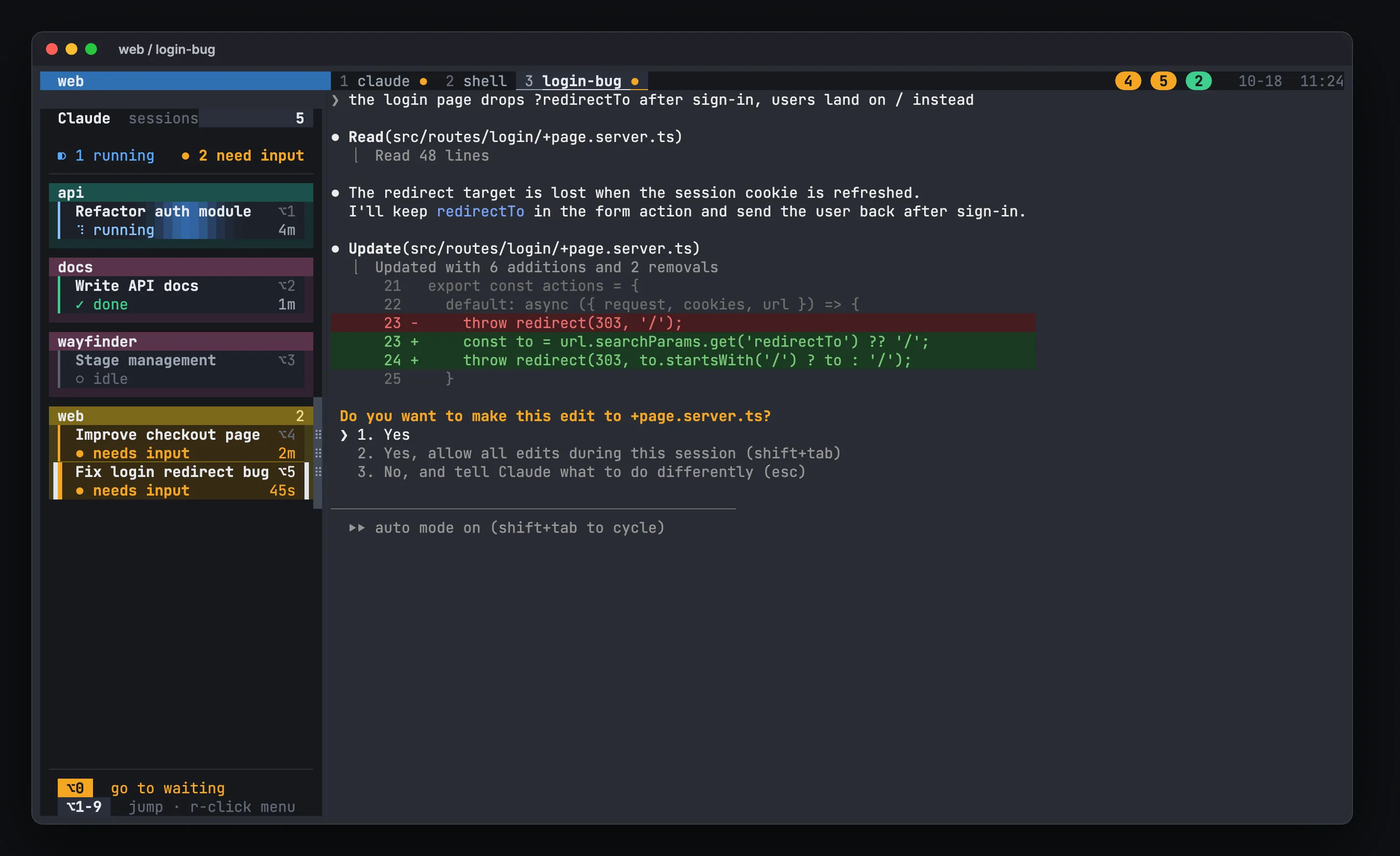
What you get on top of plain tmux:
- A card per Claude, grouped by project, with its state (running, needs input, done, idle) and how long it has been in it.
Option+1…9to jump to a Claude in any tmux session,Option+0to jump to the one that has waited longest.hm ~/code/apito open a project session with a Claude window and a shell window, and prefixShift+Cto add another named Claude.- After a reboot, each pane’s Claude resumed with
claude --resume <id>.
Run hivemux doctor to check the wiring. Claude running outside tmux does not appear in the sidebar. The full key list is at /docs/keys/, and /docs/how-it-works/ explains the hooks.
Common problems
claudenot found inside tmux. The tmux server inherits the PATH of whatever started it. Stop it withtmux kill-server(this ends everything in tmux) and start it again from a terminal whereclaudeworks.- No desktop notifications from Claude inside tmux. Add
set -g allow-passthrough onso terminal notifications reach the outer terminal. - Colors look wrong. Set
set -g default-terminal "tmux-256color". - Option shortcuts do nothing. The terminal is not sending Option as Alt; fix it in the terminal’s settings, then fully quit and reopen it.
More fixes are in /docs/troubleshooting/.
FAQ
Why does Ctrl+B not reach Claude Code inside tmux?
Ctrl+B is tmux's default prefix, so tmux takes the key before Claude Code sees it. Change the prefix (hivemux's recommended keys use Ctrl+A), or press Ctrl+B twice, which tmux's default send-prefix binding passes through.
Shift+Enter submits the prompt instead of adding a new line in tmux. How do I fix it?
Add `set -s extended-keys on` and `set -as terminal-features 'xterm*:extkeys'` to ~/.tmux.conf, then reload with `tmux source-file ~/.tmux.conf`. Ctrl+J inserts a new line in any case.
Does Claude Code keep running when I close the terminal?
Only if it runs inside tmux (or a similar multiplexer). The tmux server owns the process, so closing the terminal window detaches the client and Claude keeps working.
Does hivemux work with my existing tmux config?
Yes. `hivemux setup` adds a marked block to ~/.tmux.conf and leaves the rest alone; `hivemux uninstall` removes exactly that block.