How to resume Claude Code sessions after a reboot
Short answer
Claude Code saves every conversation per project folder, so `claude --continue` reopens the latest one in the current folder and `claude --resume` opens a picker or a session by ID or name. tmux keeps sessions alive when the terminal closes; after a reboot, tmux-resurrect restores the layout and hivemux runs `claude --resume <id>` in each pane.
Closing a terminal tab, quitting the terminal app or restarting the Mac all stop a running claude process. The conversation itself is not lost: Claude Code keeps transcripts on disk and can reopen them. What is lost is the setup around it, meaning which folder each session ran in and which window it was in. This guide covers both halves.
Step 1. Reopen a conversation with Claude Code itself
Claude Code stores sessions per project directory, so start from the folder you worked in.
cd ~/code/api
# the most recent conversation in this folderclaude --continue     # or: claude -c
# pick from a list, or name a session directlyclaude --resume       # or: claude -rclaude --resume login-bugclaude --resume 550e8400-e29b-41d4-a716-446655440000
Inside a running session, /resume switches to another conversation, and /resume <name> opens an exact match. In the picker, the current worktree is shown by default; Ctrl+W widens it to all worktrees of the repository and Ctrl+A to all projects.
Two habits make this much easier:
- Name sessions.
claude -n login-bug(or/renameduring a session) gives the conversation a name you can pass to--resumeand recognise in the picker. - Resume in the right folder.
--continueonly looks in the current directory. With an ID,--resumesearches the current project and its worktrees first, then every other project on the machine.
One caution from Anthropic’s docs: if you resume the same session in two terminals without forking, messages from both interleave into one transcript. Use --fork-session if you want a copy instead.
Step 2. Stop losing sessions when the terminal closes
Run Claude inside tmux and closing the terminal no longer stops it. The tmux server keeps the process running; reattach with:
tmux attachThis covers the most common case: you closed the window by accident, or quit the terminal at the end of the day while a task was still working. See How to use Claude Code with tmux for the setup.
tmux does not survive a reboot, though. When the Mac restarts, the tmux server and every process in it are gone.
Step 3. Restore the tmux layout after a reboot
tmux-resurrect saves sessions, windows, panes and their working folders to disk; tmux-continuum saves automatically and restores on the next start. With both, a reboot brings back your windows in the right folders, but each pane comes back as an empty shell. Resurrect does not know which Claude conversation was running where, so you would still go pane by pane typing claude -c or picking from claude --resume.
Step 4. Let hivemux resume each pane
hivemux is a tmux sidebar that shows every Claude Code session — running, waiting for you, or done — and lets you jump to the one that needs you. It also fills the gap above.
How it works:
- Claude Code hooks registered by
hivemux setupwrite each session’s id and folder onto its tmux pane whenever a session starts. - Every time tmux-resurrect saves (continuum does it every 5 minutes), hivemux saves the matching pane-to-session list.
- After a reboot, opening Ghostty runs
hivemux-attach. With no tmux server running, it starts one and tmux-resurrect recreates sessions, windows, panes and folders. hivemux-panes restorereads the saved list and, in each pane that sits at a shell prompt, changes to the folder that Claude was started in and typesclaude --resume <id>.- You land on the session you were last looking at before the reboot.
Sessions you ended with /exit (or Ctrl+D) are not resumed. With Remote Control turned on, each resumed conversation registers again and shows in the Claude app.
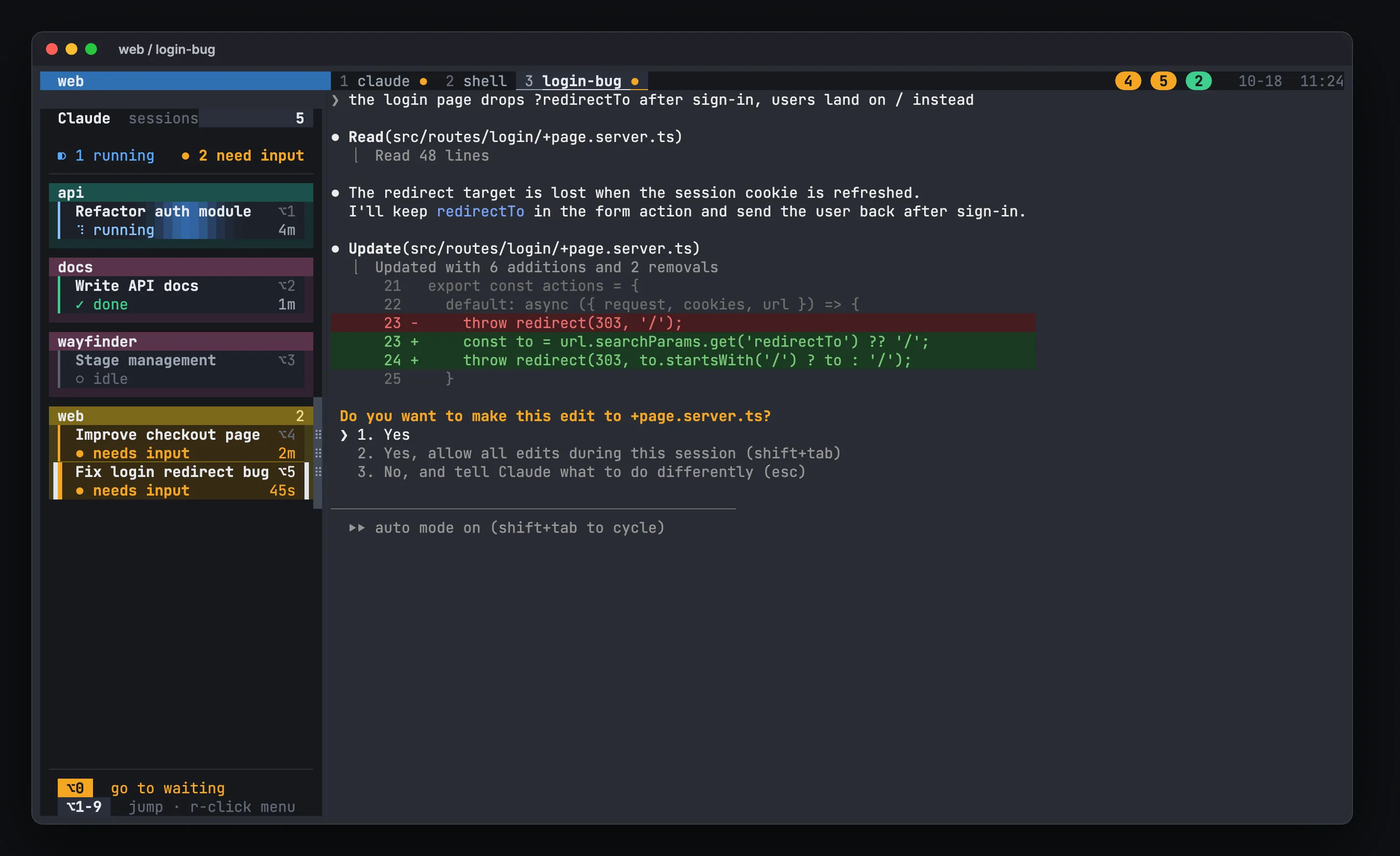
Install:
curl -fsSL https://hivemux.dev/install.sh | bashor
brew install esteban-eg-kim/tap/hivemuxhivemux setupSetup downloads tmux-resurrect and tmux-continuum, or uses yours from ~/.tmux/plugins.
What survives what
| Event | tmux sessions and layout | Claude conversation |
|---|---|---|
| Close a terminal window or quit the app | kept | keeps running |
| Mac sleeps | kept | pauses, then continues |
| Reboot or crash | restored from the last save | resumed by hivemux |
End with /exit or Ctrl+D |
window stays | not resumed |
Useful commands
hivemux-panes list # panes hivemux will resume after a rebootcat ~/.local/share/hivemux/panes.log # what happened at the last restoretouch ~/tmux_no_auto_restore # skip restore on the next starttmux set-environment -g HIVEMUX_NO_RESUME 1 # restore the layout but do not resume ClaudeAutosave runs every 5 minutes. After opening something important, save at once with prefix Ctrl+S; prefix Ctrl+R restores the last save by hand.
In the log, busy means a pane was not at a shell prompt and was skipped, and pane missing means the layout changed and the pane no longer exists. In both cases run claude -c in that folder. More in /docs/troubleshooting/, and the full flow in /docs/how-it-works/.
FAQ
Where does Claude Code store its sessions?
Per project directory, as `~/.claude/projects/<project>/<session-id>.jsonl`, where `<project>` is the working directory path with non-alphanumeric characters replaced by `-`. By default transcripts are kept for 30 days (the `cleanupPeriodDays` setting).
What is the difference between claude --continue and claude --resume?
`--continue` (`-c`) loads the most recent conversation in the current directory. `--resume` (`-r`) resumes a specific session by ID or name, or shows an interactive picker.
Why did one Claude not come back after a reboot with hivemux?
Run `hivemux-panes list` and read `~/.local/share/hivemux/panes.log`. A session ended with /exit is not resumed, one started after the last save is not in the list, and `busy` means the pane was not at a shell prompt; run `claude -c` in that folder.
Does tmux-resurrect restore Claude Code conversations?
It restores sessions, windows, panes and their folders, but it knows nothing about which Claude conversation ran in each pane. hivemux adds that link through Claude Code hooks.