How to get notified when Claude Code needs input or finishes
Short answer
Claude Code can notify you itself through its preferredNotifChannel setting (desktop notifications in iTerm2, Ghostty and Kitty, or the terminal bell), and you can run any command on its Notification and Stop hooks. With many sessions in tmux, hivemux adds macOS notifications and a status-line pickup board showing which task needs you.
A Claude Code task can run for a few seconds or many minutes, and it may stop halfway to ask for permission. Without a signal you either watch the terminal or come back too late. There are three layers to fix this: Claude Code’s own notification setting, hooks for anything custom, and a board that tracks many sessions at once.
Option 1. Claude Code’s built-in notifications
Claude Code has a setting, preferredNotifChannel, that chooses how it notifies you “when a task completes or a permission prompt is waiting”. In /config it appears as Local notifications. The values are:
| Value | Behaviour |
|---|---|
auto (default) |
Desktop notification in iTerm2, Ghostty and Kitty; in Terminal.app, the bell (only when Terminal’s audible bell is off); nothing elsewhere |
terminal_bell |
Rings the terminal bell |
iterm2, iterm2_with_bell |
iTerm2 notification, optionally with the bell |
kitty, ghostty |
That terminal’s notification |
notifications_disabled |
Off |
In iTerm2 you also need to allow it: Settings → Profiles → Terminal → check “Notification Center Alerts”, then Filter Alerts → “Send escape sequence-generated alerts”. Ghostty and Kitty pass the notification to macOS without extra setup, including over SSH.
Inside tmux, these notifications do not reach your terminal unless tmux lets them through. Add this to ~/.tmux.conf:
set -g allow-passthrough onOption 2. Notification and Stop hooks
Hooks run a command of your choice on Claude Code events. Two matter here:
Notificationruns when Claude Code sends a notification. Its matcher is the notification type, for examplepermission_prompt(Claude needs you to approve a tool use and the prompt has waited about six seconds) andidle_prompt(Claude finished responding about 60 seconds ago and you have not typed since).Stopruns when the main agent has finished responding. It does not run when you interrupted it.
Anthropic’s hooks guide shows a desktop notification on macOS. Add it to ~/.claude/settings.json:
{ "hooks": { "Notification": [ { "matcher": "", "hooks": [ { "type": "command", "command": "osascript -e 'display notification \"Claude Code needs your attention\" with title \"Claude Code\"'" } ] } ] }}On Linux the docs use notify-send 'Claude Code' 'Claude Code needs your attention'. For a sound instead, a command such as afplay /System/Library/Sounds/Glass.aiff works. Note that osascript notifications are shown through the Script Editor app; if Script Editor is not allowed to notify, the hook fails silently.
Hooks are flexible: you can send the message to Slack, a phone push service, or a log. What they do not give you is an overview. With five sessions, five notifications that all say “needs your attention” still leave you hunting for the right window.
Option 3. Push to your phone
If you use Remote Control (see How to continue Claude Code from your phone), open /config and turn on Push when actions required (and optionally Push when Claude decides). The Claude app then gets a push whenever a session needs approval. If /config says no mobile device is registered, open the Claude app on the phone once.
hivemux: notifications plus a board
hivemux is a tmux sidebar that shows every Claude Code session — running, waiting for you, or done — and lets you jump to the one that needs you. It registers Claude Code hooks (including Notification, PermissionRequest and Stop) that record each session’s state on its tmux pane, and uses that state for three signals.
1. macOS notifications. When a task needs input or finishes, you get a notification with the task name, the project and the state. The task you are looking at is skipped. They are sent as a terminal notification (OSC 777) by the sidebar, so they show in terminals that support it, such as Ghostty.
2. The pickup board. Like the order board at a food court, the right side of the tmux status line shows a round badge with the task’s Option number for every task, in any project, that needs input (amber) or finished and has not been seen yet (green). A waiting badge blinks until you answer; a finished one blinks for its first 10 seconds and leaves once you look at it. Click a badge, or press Option and its number, to go there.
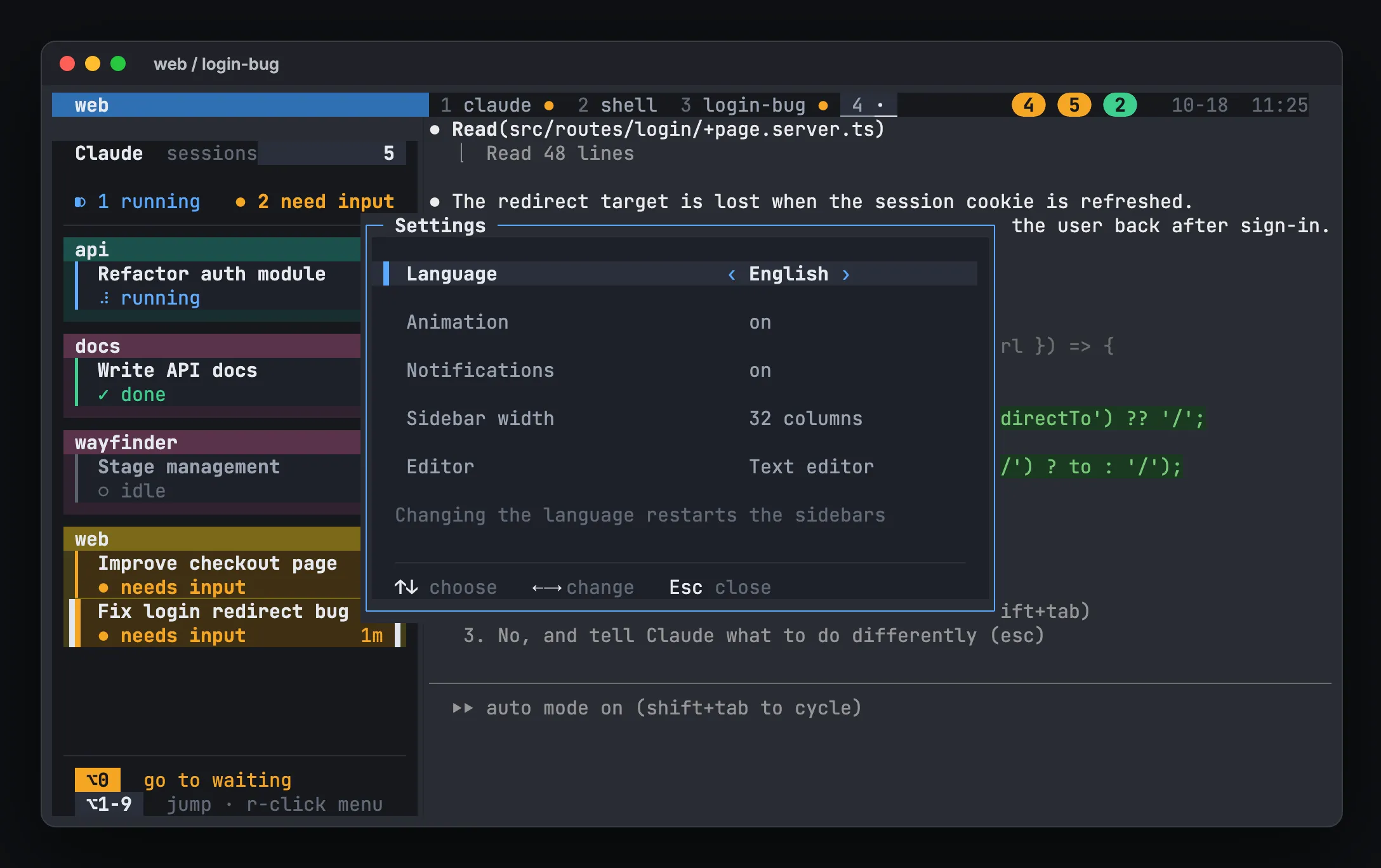
3. The sidebar. Cards that need input pulse amber and show how long they have waited. Option+0 (or prefix Space) jumps to the one that has waited longest, and with nothing waiting, to the oldest finished task you have not seen. Press it repeatedly to work through the queue.
Install it and run setup:
curl -fsSL https://hivemux.dev/install.sh | bashor
brew install esteban-eg-kim/tap/hivemuxhivemux setupThen allow your terminal in System Settings → Notifications. To turn hivemux notifications off, right-click the sidebar → Settings → Notifications.
Notifications from another Mac
If your sessions run on another Mac and you attach with hivemux connect, notifications from the remote tasks show on the Mac in front of you. Over mosh they do not pass through, and the Connect to… list marks such a host “mosh · no notifications”. See /docs/another-mac/.
If notifications do not show
- Check that your terminal is allowed in System Settings → Notifications, and that a Focus mode is not hiding them.
- In tmux, make sure
allow-passthroughis on. - With hivemux, the sidebars send the notifications, so with the sidebars hidden (prefix
b) none come. A Claude started before hivemux was installed shows up after its next prompt or tool call. hivemux doctorchecks the hooks and tmux wiring. More in /docs/troubleshooting/.
FAQ
Why do I get no Claude Code notifications inside tmux?
tmux does not pass terminal notification escapes to the outer terminal by default. Add `set -g allow-passthrough on` to ~/.tmux.conf and reload it.
My osascript notification hook does nothing. What is wrong?
osascript sends notifications through the Script Editor app, and if Script Editor has no notification permission the call fails silently. Allow Script Editor in System Settings → Notifications.
Can I get a push notification on my phone when Claude Code needs approval?
Yes, with Remote Control. In Claude Code open /config and turn on "Push when actions required"; the Claude app on your phone gets a push when an approval is needed.
Why does hivemux not notify me about the session I am looking at?
On purpose. hivemux skips notifications for the task on screen, since you can already see it. They come when the terminal is in the background or you are in another window.