
What is hivemux? A tmux sidebar for Claude Code
hivemux is a tmux sidebar that shows every Claude Code session — running, waiting for you, or done — and lets you jump to the one that needs you. It is free, open source (MIT) and runs on macOS: press Option+0 to go to the session that has waited longest, or Option+1 to Option+9 to jump straight to a numbered one.
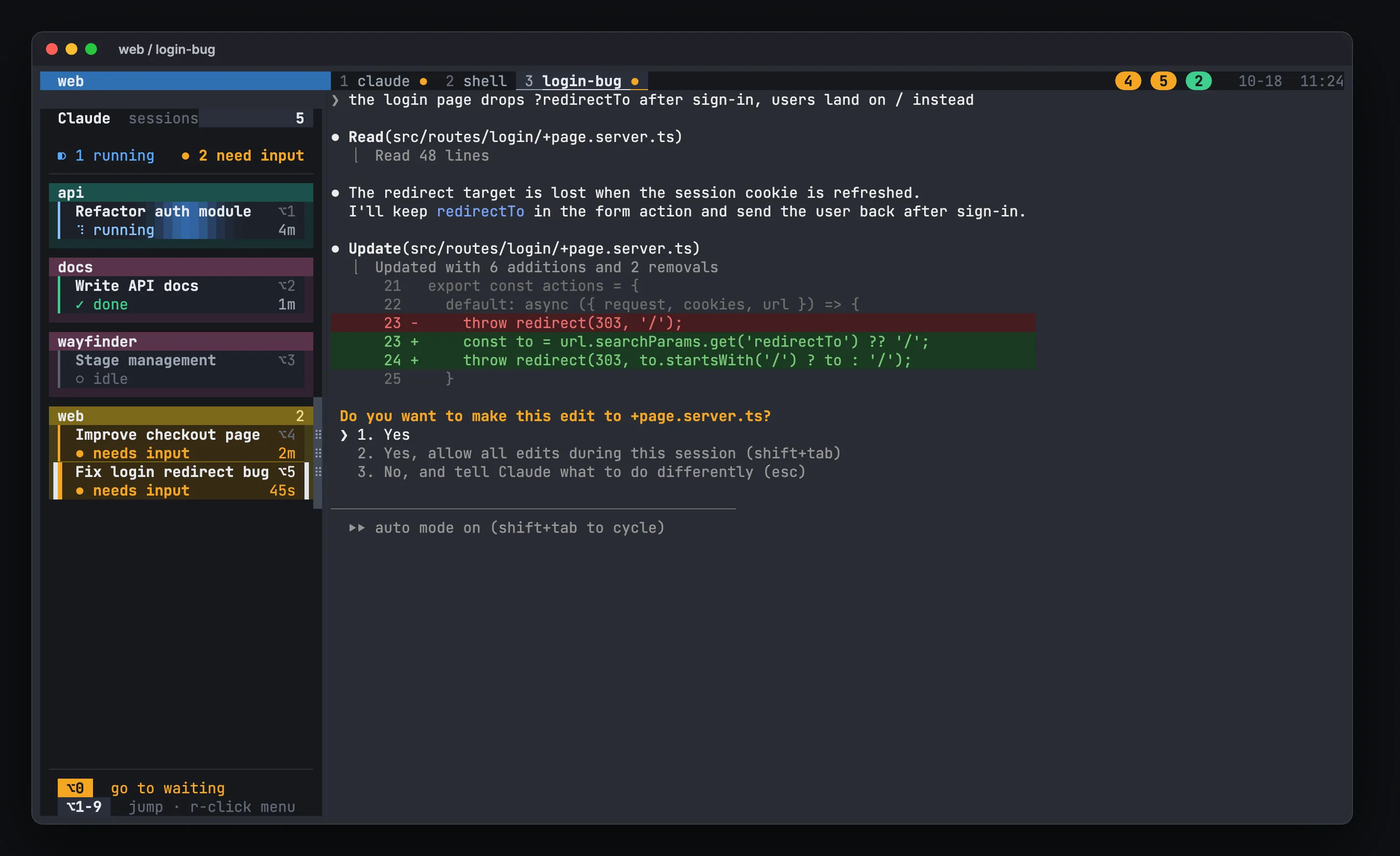
What hivemux does
Section titled “What hivemux does”When you run several Claude Code sessions at once, the hard part is knowing which one is blocked on you. hivemux adds a sidebar to every tmux window that lists every Claude Code session in every tmux session, grouped by project:
- Live state per session. Each card shows the task name (Claude’s conversation title), its state — running, needs input, done, or idle — and how long it has been in that state. Cards that need input pulse amber.
- Jump keys.
Option+1…9jump to that Claude, even in another project.Option+0jumps to the oldest waiting Claude, or else the oldest finished one you have not seen. - Pickup board. The right of the top status line shows a round badge with the
Optionnumber of every task that needs input (amber) or finished unseen (green). Click a badge to go there. - Notifications. A macOS notification when a task needs input or finishes, except the one you are looking at.
- Survives restarts. Close the terminal and tmux keeps every session alive. Reboot the Mac and tmux-resurrect restores the layout while hivemux runs
claude --resume <id>in each pane. - Projects.
hm ~/code/apiopens one tmux session per folder, with a named Claude window and a shell window. - Work from another Mac.
hivemux connectattaches a laptop to another Mac’s tmux over ssh, with the same sidebar, notifications and forwarded dev server ports. - Bee office. An optional window where every Claude session is a bee in a small office, typing while it works and running to the question window when it needs you.
Who it is for
Section titled “Who it is for”hivemux is for developers who run more than one Claude Code session at a time on a Mac and want to stop cycling through terminal tabs to find the one asking for approval. See Run multiple Claude Code sessions for the workflow it is built around.
Requirements
Section titled “Requirements”- macOS (Linux likely works but is untested)
- tmux 3.3 or newer, jq, git, python3 (Xcode Command Line Tools)
- Claude Code, logged in
- Ghostty recommended; any terminal works if you start
tmuxyourself
Install in one line
Section titled “Install in one line”curl -fsSL https://hivemux.dev/install.sh | bashOr with Homebrew:
brew install esteban-eg-kim/tap/hivemuxhivemux setupFull details are on the Install page; then follow the Quick start.
Privacy
Section titled “Privacy”hivemux has no server and no telemetry. It runs on your Mac and reads Claude Code hook events and tmux state. Its only network requests are fetching the latest Claude Code version when you update Claude (npm registry or Homebrew API), cloning or updating hivemux and its tmux plugins from GitHub, and ssh or mosh to Macs you connect to yourself. See How it works.
License
Section titled “License”hivemux is MIT licensed. It is an independent project and is not affiliated with or endorsed by Anthropic. “Claude” and “Claude Code” are trademarks of Anthropic.