
hivemux bee office for Claude Code sessions
The bee office is a hivemux window where every Claude Code session is a bee in a small office: it types at its desk while working, runs to the question window when it needs you, and holds up a jar of honey when done. Open it with the 🐝 button at the top of the sidebar, prefix Shift+B, right-click → Bee office, or hivemux office. Click a bee to go to its session.
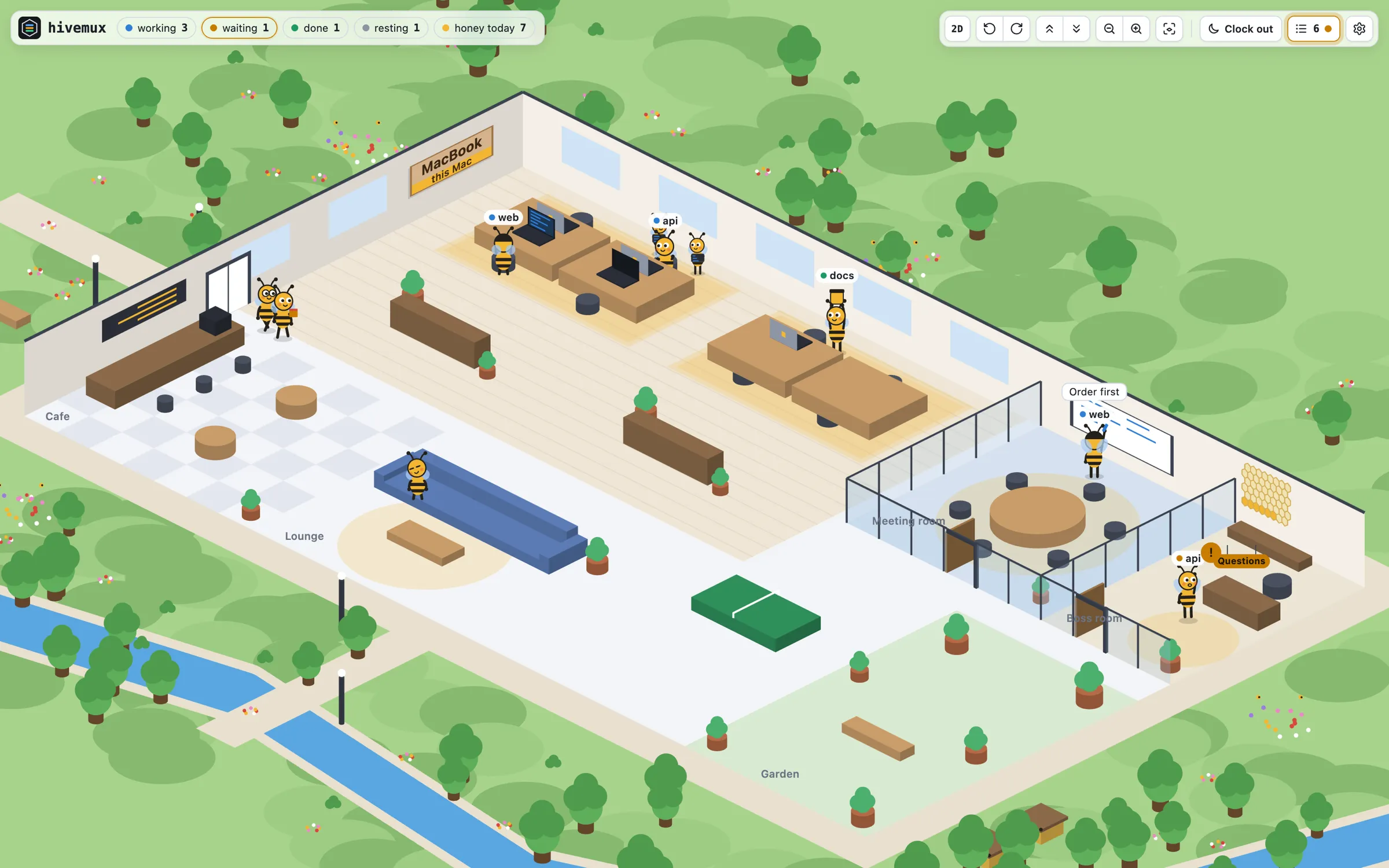
Open the bee office
Section titled “Open the bee office”hivemux officeOr press prefix Shift+B, click the 🐝 button at the top of the sidebar, or right-click the sidebar → Bee office.
The window is built once with the Mac’s Swift compiler (Xcode Command Line Tools). hivemux setup builds it ahead of time; if it is not there yet, the build progress shows while it builds. Without the compiler, the office opens in the browser.
What the bees mean
Section titled “What the bees mean”| Session state | What the bee does |
|---|---|
| Working | Types at its desk. Subagents stand by its desk as small helper bees with laptops |
| Plan mode | Plans at the whiteboard in the meeting room, joined by two office colleagues |
| Needs input | Runs to the question window in the boss room and lines up in the order it started waiting. The bee at the front pops out in front of the window; after 2 minutes waiting it turns red |
| Done | Holds up a jar of honey by its desk; once you have looked at the task, it stores the honey in the honeycomb |
| Idle | Rests in the cafe, on the sofa, at the ping-pong table or in the garden |
Desks are shared: only bees that are not resting have one. The filled honeycomb cells are today’s finished tasks.
Session list
Section titled “Session list”The ☰ button at the top right (or L) opens a drawer listing sessions grouped by Mac, waiting sessions first. Hovering a row rings that bee; a click goes to the session. While the drawer is closed, ☰ blinks when a session needs you. The drawer’s Honey tab ranks bees by honey today, this week and this month.
Moving around
Section titled “Moving around”The office is seen at an angle.
| Control | Action |
|---|---|
mouse wheel / + - |
zoom |
| drag | move |
right-drag or Shift-drag / Q E / W S |
turn / change height |
0 |
whole floor |
| 2D / 3D buttons | flat plan from straight above / back to the angle |
The view and mode are kept for next time. The gear (⚙) can turn popping out off, hide task and project names for screen sharing, or keep it always day or always night. View → Keep on Top (⌘+T) keeps the window above others.
Clock out and clock in
Section titled “Clock out and clock in”The 🌙 Clock out button (or right-click the sidebar → Clock out) asks, then stops every Claude for the night. The bees clap and walk home to their own houses in a village past the yard. A Claude still working or waiting for you works overtime and goes home once done. ☀️ Clock in brings every Claude back in the same conversation (claude --resume) as the bees walk back to work. A reboot while clocked out leaves them home.
A bee is a project plus the Claude’s name in it, so it stays the same bee across /clear or a new conversation. Closing its project or that Claude means it leaves the company; opening it again rehires it.
Bees from other Macs
Section titled “Bees from other Macs”While you are connected to another Mac with hivemux connect, its sessions get desks of their own. Each Mac’s desks sit on a carpet of its color with its name on a plaque on the wall; change the name in Settings → This Mac’s name. On a remote screen, the 🐝 button opens the office on the Mac you connect from. See Work from another Mac.